
Compare Creality 3D K1C vs Creality 3D Ender 7
Comparison between the best 3D printers
Choose the best 3D printer at the best price. The cheapest 3D printers are here.
Buy a 3D printer here with 3D Fila.
 |
 |
|
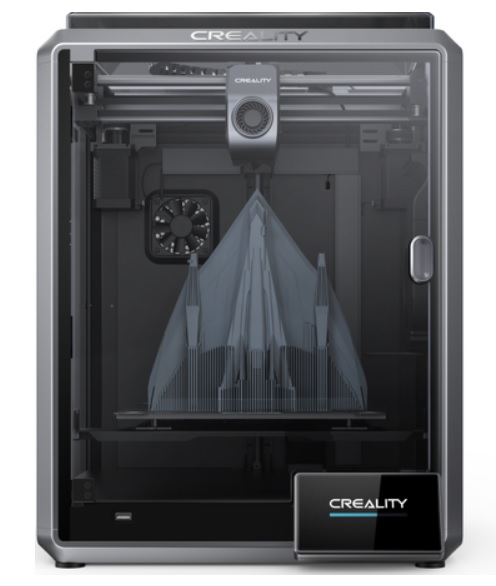
| Model | Creality 3D K1C[BUY K1C] |
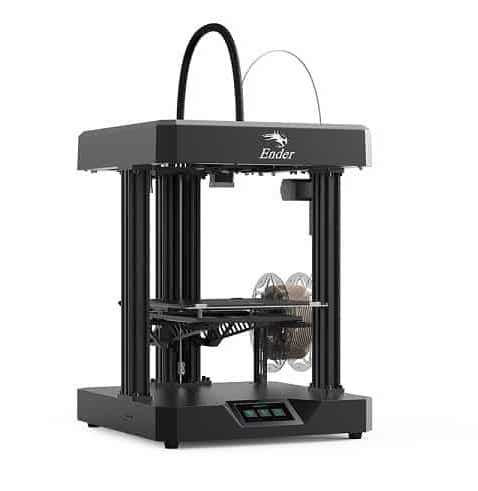
Creality 3D Ender 7[BUY Ender 7] |
| Printing Material | Filament | Filament |
| Estimated price | $449,00 | $429,00 |
| Date of registration in the system | ||
| Manufacturer | Creality 3D | Creality 3D |
| Release Year | 2024 | 2021 |
| Print Volume [mm] | 220x220x250 | 250x250x300 |
| Printer Size [mm] | 355x355x480 | 430x460x570 |
| Weight [kg] | 12,4 | 17,2 |
| Power Loss Recovery | YES | YES |
| Enclosed printer | YES | NO |
| Bed Leveling | Automatic | Manual |
| Filament End Sensor | YES | YES |
| Bed type | Heated | Heated |
| Power supply system | Direct Drive | Bowden |
| Standard nozzle | 0,4 | 0,4 |
| Maximum Nozzle Temperature [°C] | 300 | 260 |
| Maximum Bed Temperature [°C] | 120 | 100 |
| Maximum printing speed [mm/s] | 600 | 250 |
| Filament holder | YES | YES |
| Camera for supervision | YES | NO |
| Recommended filaments | ABS, PLA, PETG, PET, TPU, PA, ABS, ASA, PC, PLA-CF, PA-CF, PET-CF | PLA, PETG, Tritan, Flex, ABS |
| Recommended slicers | Creality Print; Cura, Simplify3D e PrusaSlicer | Cura, Simplify, Slic3r, IdeaMaker |
| Maximum Resolution [mm] | 0,1 | 0,1 |
| Kinematics | - | - |
| Extruder Type | - | - |
| Klipper Firmware | NO | NO |
| Input Shaping | NO | NO |
| Max Volumetric Flow [mm³/s] | - | - |
| Power Supply | 110/220V / 350W | 110/220V / 350W |
| Connectivity | Ethernet / USB / Wi-Fi | SD / USB |
| Release date | 2024 | 2021 |
| Extra features | The Creality K1C is a fully enclosed CoreXY 3D printer featuring an all-metal extruder, tri-metal âUnicornâ nozzle for abrasive materials, automatic bed leveling with nozzle cleaning, AI-assisted failure detection, built-in camera for timelapse, enhanced cooling system, root access to Klipper firmware, and compatibility with PLA-CF, PA-CF, PET-CF, TPU, ABS, and more. | Crealityâs Ender 7 printer offers remarkable print speeds, utilizing CoreXY kinematics for precise and fast movement. With a 250x250x300mm build area, dual direct extruder, and custom hotend, the Ender 7 is capable of printing at high speeds, although quality may suffer on smaller prints. Assembly is relatively straightforward, but the machine is noisy and can get hot. Its true speed potential is most noticeable on larger prints, where it outperforms its competitors. |
| Support for multiple colors and materials (AMS and CFS) | NO | NO |
Notes * |
||
| Cost-benefit | 8 / 10 | 7 / 10 |
| Hardware | 4.8 / 10 | 1 / 10 |
| Screen | . | . |
| Print volume | 10 / 10 | 10 / 10 |
| Performance | 10 / 10 | 7 / 10 |
| [BUY K1C] | [BUY Ender 7] |
Conclusion |
Conclusion: Comparing the K1C and Ender 7 3D Printers In choosing between the Creality K1C and the Ender 7, potential buyers must consider their specific needs, preferences, and budget. Both printers are excellent options, but they cater to different user profiles. K1C (Creality 3D)
Ender 7 (Creality 3D)
Final Verdict: The K1C is the best choice for users who prioritize ease of use, safety, and the ability to print with a variety of materials, including more advanced options. Its enclosed design and automatic features make it suitable for beginners and those looking for a hassle-free printing experience. On the other hand, the Ender 7 is ideal for users who have some experience with 3D printing and are looking for a printer that can handle larger prints at impressive speeds. It offers great value for those willing to deal with manual leveling and the challenges of an open-frame design. Ultimately, the best buy depends on your specific needs: choose the K1C for a more user-friendly, versatile experience, or the Ender 7 for larger, faster prints if you're comfortable with a bit more hands-on management. |