

Compare Creality 3D K1C vs Creality 3D Ender 5
Comparison between the best 3D printers
Choose the best 3D printer at the best price. The cheapest 3D printers are here.
Buy a 3D printer here with 3D Fila.
 |
 |
|
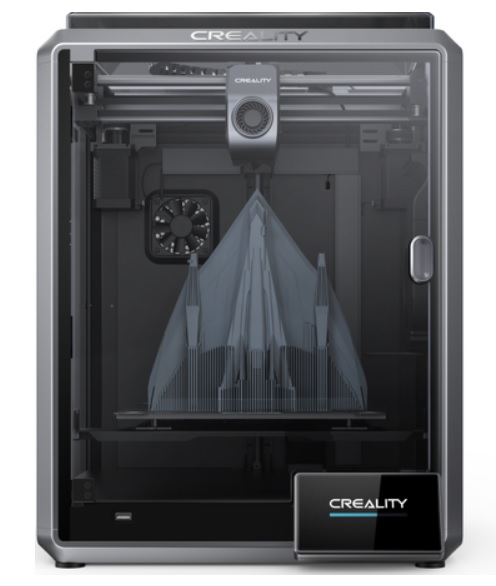
| Model | Creality 3D K1C[BUY K1C] |
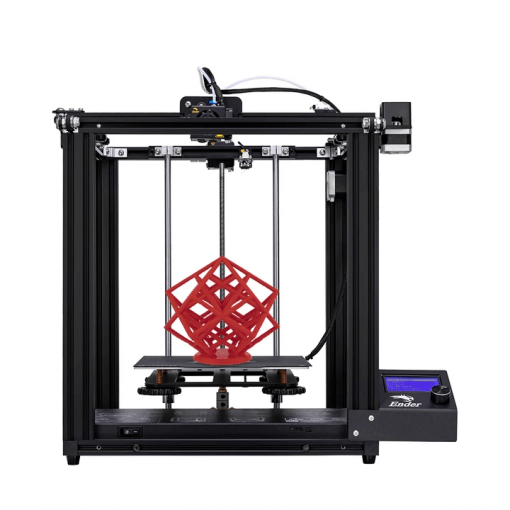
Creality 3D Ender 5[BUY Ender 5] |
| Printing Material | Filament | Filament |
| Estimated price | $449,00 | $399,00 |
| Date of registration in the system | ||
| Manufacturer | Creality 3D | Creality 3D |
| Release Year | 2024 | 2020 |
| Print Volume [mm] | 220x220x250 | 220x220x300 |
| Printer Size [mm] | 355x355x480 | 485x510x552 |
| Weight [kg] | 12,4 | 11,8 |
| Power Loss Recovery | YES | YES |
| Enclosed printer | YES | NO |
| Bed Leveling | Automatic | Manual |
| Filament End Sensor | YES | NO |
| Bed type | Heated | Heated |
| Power supply system | Direct Drive | Bowden |
| Standard nozzle | 0,4 | 0,4 |
| Maximum Nozzle Temperature [°C] | 300 | 255 |
| Maximum Bed Temperature [°C] | 120 | 100 |
| Maximum printing speed [mm/s] | 600 | 180 |
| Filament holder | YES | YES |
| Camera for supervision | YES | NO |
| Recommended filaments | ABS, PLA, PETG, PET, TPU, PA, ABS, ASA, PC, PLA-CF, PA-CF, PET-CF | PLA, TPU, ABS, PETG |
| Recommended slicers | Creality Print; Cura, Simplify3D e PrusaSlicer | Cura, Simplify, Slic3r |
| Maximum Resolution [mm] | 0,1 | 0,1 |
| Kinematics | - | - |
| Extruder Type | - | - |
| Klipper Firmware | NO | NO |
| Input Shaping | NO | NO |
| Max Volumetric Flow [mm³/s] | - | - |
| Power Supply | 110/220V / 350W | 24V / 360W |
| Connectivity | Ethernet / USB / Wi-Fi | SD / USB |
| Release date | 2024 | 2020 |
| Extra features | The Creality K1C is a fully enclosed CoreXY 3D printer featuring an all-metal extruder, tri-metal âUnicornâ nozzle for abrasive materials, automatic bed leveling with nozzle cleaning, AI-assisted failure detection, built-in camera for timelapse, enhanced cooling system, root access to Klipper firmware, and compatibility with PLA-CF, PA-CF, PET-CF, TPU, ABS, and more. | Crealityâs Ender 5 stands out with a solid frame and a larger 220 x 220 x 300mm print volume. Its assembly is simple and quick, offering high print quality and speeds of up to 80mm/s. With a magnetic bed, it makes it easy to remove prints. Notable for being hackable and expandable, the Ender 5 continues Crealityâs innovative tradition in the affordable 3D printer market. Equipped with a 350W/24V Meanwell power supply, it heats up quickly, in addition to having efficient cable management and modified Marlin firmware. Its unique design includes dedicated stepper motors for each axis and smooth movement on the Y axis, providing more consistent and detailed prints. |
| Support for multiple colors and materials (AMS and CFS) | NO | NO |
Notes * |
||
| Cost-benefit | 8 / 10 | 7 / 10 |
| Hardware | 4.8 / 10 | 0.5 / 10 |
| Screen | . | . |
| Print volume | 10 / 10 | 10 / 10 |
| Performance | 10 / 10 | 7 / 10 |
| [BUY K1C] | [BUY Ender 5] |
Conclusion |
Conclusion: Comparing the K1C and Ender 5 3D Printers When evaluating the K1C and Ender 5 3D printers, it is essential to consider their features, build quality, usability, and user profile to determine which printer serves best for specific needs. K1C (Creality 3D)
Ender 5 (Creality 3D)
Final Verdict: For users who prioritize speed, advanced features, and a variety of material compatibility, the K1C is the best choice, especially for professionals or serious hobbyists looking to produce high-quality prints quickly with minimal hassle. Its enclosed design and automated features provide a robust platform for a wide range of applications. Conversely, the Ender 5 is ideal for beginners, casual users, or those who enjoy tinkering with their machines. Its affordability, ease of assembly, and established community support make it a solid choice for those new to 3D printing or looking for a reliable printer for everyday use. While it lacks the advanced features of the K1C, it still offers a high-quality printing experience. Ultimately, the choice between the K1C and Ender 5 will depend on your specific needs and experience level. The K1C excels in performance and automation, while the Ender 5 shines in affordability and user accessibility. |