

Compare Creality 3D K1C vs Sovol Comgrow T300
Comparison between the best 3D printers
Choose the best 3D printer at the best price. The cheapest 3D printers are here.
Buy a 3D printer here with 3D Fila.
 |
 |
|
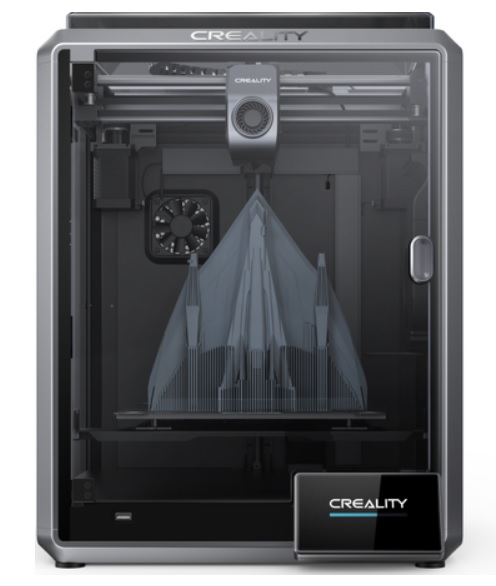
| Model | Creality 3D K1C[BUY K1C] |
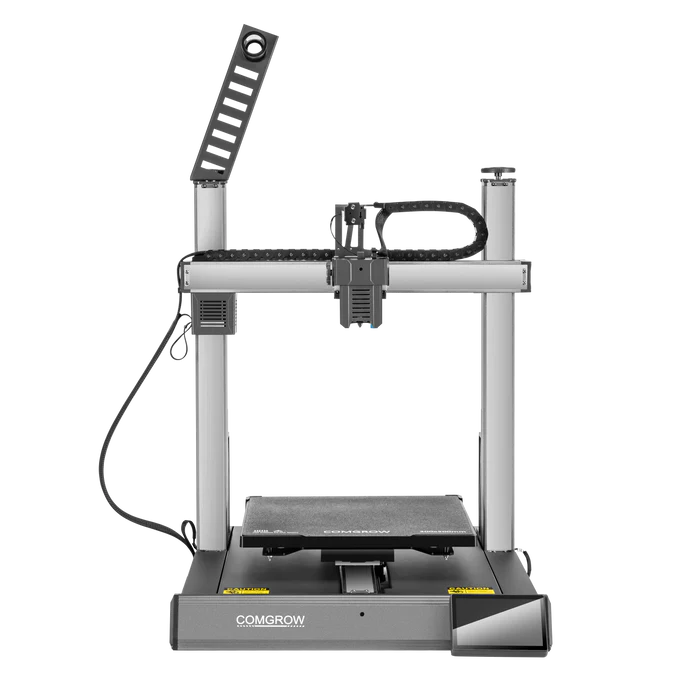
Sovol Comgrow T300 |
| Printing Material | Filament | Filament |
| Estimated price | $449,00 | $449,00 |
| Date of registration in the system | ||
| Manufacturer | Creality 3D | Sovol |
| Release Year | 2024 | 2024 |
| Print Volume [mm] | 220x220x250 | 300x300x350 |
| Printer Size [mm] | 355x355x480 | 503x631x831 |
| Weight [kg] | 12,4 | 17 |
| Power Loss Recovery | YES | YES |
| Enclosed printer | YES | NO |
| Bed Leveling | Automatic | Automatic |
| Filament End Sensor | YES | YES |
| Bed type | Heated | Heated |
| Power supply system | Direct Drive | Direct Drive |
| Standard nozzle | 0,4 | 0,4 |
| Maximum Nozzle Temperature [°C] | 300 | 300 |
| Maximum Bed Temperature [°C] | 120 | 100 |
| Maximum printing speed [mm/s] | 600 | 600 |
| Filament holder | YES | YES |
| Camera for supervision | YES | NO |
| Recommended filaments | ABS, PLA, PETG, PET, TPU, PA, ABS, ASA, PC, PLA-CF, PA-CF, PET-CF | PLA, PETG, PET, TPU, PA, ASA, PC, PLA CE, PA-CF, PET-CF |
| Recommended slicers | Creality Print; Cura, Simplify3D e PrusaSlicer | Bambu Studio, Super Slicer, Cura, Prusa Slicer, Orca Slicer |
| Maximum Resolution [mm] | 0,1 | 0,1 |
| Kinematics | - | - |
| Extruder Type | - | - |
| Klipper Firmware | NO | NO |
| Input Shaping | NO | NO |
| Max Volumetric Flow [mm³/s] | - | - |
| Power Supply | 110/220V / 350W | 150 W |
| Connectivity | Ethernet / USB / Wi-Fi | USB, WiFi |
| Release date | 2024 | 2024 |
| Extra features | The Creality K1C is a fully enclosed CoreXY 3D printer featuring an all-metal extruder, tri-metal âUnicornâ nozzle for abrasive materials, automatic bed leveling with nozzle cleaning, AI-assisted failure detection, built-in camera for timelapse, enhanced cooling system, root access to Klipper firmware, and compatibility with PLA-CF, PA-CF, PET-CF, TPU, ABS, and more. | The Sovol Comgrow T300 printer stands out for its technological innovations and advanced features. With a print size of 300mm300mm350mm, the T300 offers true linear rails on all axes, ensuring greater stability. Its Klipper-based intelligent core and 64-bit microcomputer increase printing speed and quality through pressure advancement and input shaping. The extruder with a gear ratio of 6.5:1 allows for more precise material control, optimizing the printing of flexible materials. In addition, the T300 features a rapid filament cooling system with a high-speed fan and a circular duct piece that improves cooling efficiency. With a 4.3-inch high-refresh rate touchscreen and an 81-point automatic leveling system, the T300 simplifies the preparation and execution of 3D prints. |
| Support for multiple colors and materials (AMS and CFS) | NO | NO |
Notes * |
||
| Cost-benefit | 8 / 10 | 7 / 10 |
| Hardware | 4.8 / 10 | 3.2 / 10 |
| Screen | . | . |
| Print volume | 10 / 10 | 10 / 10 |
| Performance | 10 / 10 | 10 / 10 |
| [BUY K1C] |
Conclusion |
Conclusion: Comparison of K1C (Creality 3D) and Comgrow T300 (Sovol) Both the K1C from Creality 3D and the Comgrow T300 from Sovol represent impressive advancements in FDM 3D printing technology, each catering to different user needs through their unique features and designs. Below, we will compare the two based on their specifications, pros, and cons, ultimately recommending the best choice for various user profiles. K1C (Creality 3D)
Comgrow T300 (Sovol)
Final Verdict:Choosing between the K1C and the Comgrow T300 ultimately depends on the user profile and specific needs:
In conclusion, both printers offer exceptional value relative to their features and capabilities. However, for those who need versatility and ease of use, the Comgrow T300 edges out as the better buy. On the other hand, users looking for advanced capabilities and print quality should consider the K1C. |